Monday, 29 August 2016

DECO 7230 - Week 4 - PRAC - Video prototype


 WEEK  4 

 - WEEK  4 - PRAC -DECO7230

Video prototype

First Unity Class 

Week4 Week 4

Video prototype starts from this week ...


In the contact class, we watched some videos of prototyping, also thought about some questions of these videos.


Can you really understand the concept?

What questions does it raise?

What could they do better?

 What do they do well?

Video Content & Approach:


 Is there a better way to show certain things?

In the practice session, we started to getting known of Unity, and I think it is a really interesting and magic application, also the tutor asked for our process of video prototype.


Video prototype in processing:


Outlook will be a normal garderobe but with two screens on left and right mirror.

The left mirror helps people to collocate their clothes, which means the screen will show different clothes they have chosen includes tops, pants, shoes, etc. 

as well they can swap different images of clothes.

The screen on the right side is system settings, which includes functions such as dryness, fragrance and disinfect germs in the 


smart garderobe


First Unity Class 

In this week practical class, we have learned the basic tools and function about unity. I saw some game in the video which created by unity, so I was very excited to learn it during this class. The unity software is similar to 3D Max software , it's very interesting because I like the 3D view. 
week 4 review
practical A
Continued working on pong ascertained the game I wished to match up was PAC 
contact 
The contact season covered interactive prototypes and what the prototypes were attempting to test.
no in-class questions given.

The Design Process:
From this course, I learn how to create the 3D object and make an animation and some effect on these object. There are three different area,
practical B
commenced using catlike coding to construct my maze base,the coding requires greater attention than first thought.
In the contact session , we learned about design process from some examples, such as  interactions  
The Hierarchy,
The project and the inspector area. In the Hierarchy area, we can create and choose different shapes of 3D or 2D object. 

Analysis: researchers, problem understanding.

Design: ideas generating and exploring.
Evaluate:get feedbacks to find problems and solve problems.
Development: use of multiple methods to develop the prototype.
In the practice session, we learned more about Unity. If for week 3 is the start of the study in Unity, this week we learned deeper as starting to learn code from the blackboard. After learning these things, I started to design the interface of my project...although it is quite hard T.T. I can do it. Here is an image of part of code:
In the week four contact class, we have discussed some different interactive prototypes. Those different interactive prototypes were included: The Proxemic Media Player, Globemasters, Library Search Interface and Email Guitar.  Moreover, we learned the design process 
(analysis, design, development and evaluate). In addition, we discussed the prototyping technologies such as Flash AS3, Silverlight etc. Beside this, we knew the what the Unity is. Last of all, this week contact did not have an in-class exercise.
And we have learned that how to control and move the view form click different tools on the tool area.


Sunday, 28 August 2016

week 3 - DECO 7180 - Workshop


WEEK 3 - Workshop


The workshop in this week is more like a practical class.

At first, I didn't know how to use trove tool correctly, then I google learning video about how to use the trove. 


Firstly, I found that I can add the different list of material in the trove website. 

Then,I recognize the trove website allow you to collect different items on a similar theme or topic. I try to learn how to make a terrific list which can become a resource in trove. 
Connection to API
The first step to API


The API of Trove provides an interface for the developers to visit their database.What we will do is to send certain request to the server and 
receive the news from server —— 


namely, build a connection tunnel.
Here is a JSON script of response parameter, which returns the results of the request  ( query: Wragge and weather ).
Then,we can apply for the API key to gain the visit and development authority.
We will see the XML file which contains the records:


The list also can be used by other people, which help them to find relevant reuse
When I use the trove, I found that I can add a web page to the list as well.


Friday, 12 August 2016

DECO 7230 WEEK 3


 DECO 7230

WEEK 3 - Video Critique
In this week, we are preparing the kick start video
So the tutor gives us some example of the Kickstarter video
So this week we were shown some intensely colossal

We have looked at four videos which made by the previous students 
Kickstarter videos and some beautiful decent ones, and they asked to identify the trends in each
With that in mind, here's what we find

They are the different type of Kickstarter video
So they have different advantages and disadvantages. 
In our group, we have had discussion after each video
and we find Good Videos and Bad Videos
The first video
Is an explaining kind of video
The designer using spoken explanation way to show how his product works to the public
It explained clear and not too fast


The second video
Is more clear than the first video because the creator uses amusing cartoon to show his idea about the product
This video contains a good proportion from consistency


The third video 
Is kind of board game 
This game is very creative because the designer creates a new method to play the game
But without rules or elements of the game like no voice instruction and no text instructions it is difficult to understand


The fourth video 
Is a professional commercial video
Is more clear than From this four video


Advantages and Disadvantages
Voiceovers
Filters + transition animations
Attractive models
Futuristic look + ambient music
functional and sleek prototype
 Explanation by the developers
Bad audio / visuals
Lack of useful music
Little to no video editing

__________________________________________


DECO7230 For - Video Prototype 


Here is the Video Prototyping That of used for testing the Outcome of 
( the Keep visits track of children - Protection)    


Video Prototype  


the I will be using the answers to this survey to aid in my user testing for my project. For your feedback Select 

Thanks! Please have a look


this is my blog Address


__________________________________________________________________________


DECO 7230 - WEEK 2

WEEK 2 - 


This week (2) together in contact class and 
practical class, we have discussed
prototype deeper and more understanding about prototyping, and but 
Also, we 've is started our project concept
we 've only Participate 
our concept with classmates in practical and made a simple 
content about the concept
Also, In the contact class, we watched some video
about how the thing can cooperate with people

In practical class, we were learned about Adobe 
Photoshop to produce GIF
How we can Graphics Interchange Format 
better known by its acronym GIF
How we can a bitmap image format
Also, we have Comparing with some
there  5  steps for creating a GIF.
 1 :  choose the "windows" --"cartoon"  
 2 :  Choose the first picture as the first layer, one layer is a frame. 
 3: Putting other pictures on top of the first pictures, then we have many layers. Click a triangle button on the cartoon window,then all the layers can be set a delay time of each frame.

( or we can editing all the layers together if we press shift to click all the layers).
 4: When I press "Space" ,  I can preview the GIF effect.
 5: save all the layer as GIF format.

We more talked about wearable Inventions but in different syntax, for example, mention an embarrassing situation and how to make it worse:
When you try to take a photo of someone without his knowledge and a capture sound goes off, a flash will also go off on both sides ( in front and back camera) to really make it worse.


The picture below is what I made in practical class by using Photoshop.


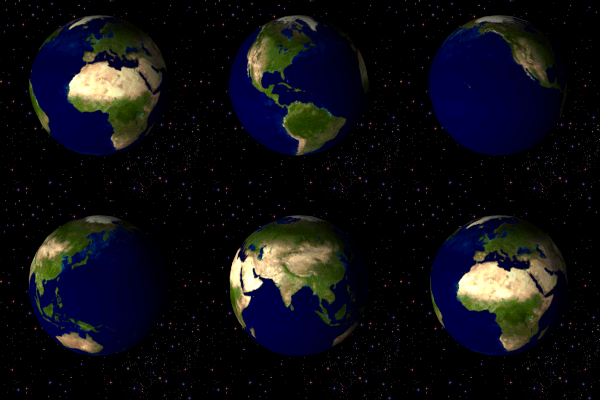
The format can GIF be of used to display animation, color . 
A rotating globe in GIF format.


DECO 7230 Week 2

In this week 2 contact sessions

Lecture 2 Exercises
Prototyping


What is the purpose of Prototyping
______________________________________________________

We have discussed some example about interactive technology
And how people interact with interactive technology
And electronic devices at home and the process of using them
through the contact went more in depth into what a prototype is
Its fundamental aspects(Precision & Evolution etc)
That is different reality prototypes technology 
which can connect the virtual life ,actual world and the user concurrently
It makes a circuit for interactive knowledge feedback.
The idea of Mixed being prototype is enhancing the user life of the sense of reality

Following this, we were tasked with selecting a common household appliance and changing its interaction
A devices I have at home, something I regularly use
Like A Kettle, or  the washing machine
How I can interaction with a kettle,washing machine or Filter water, Fill Kettle
haste switch to let kettle boil
Actually, the function of the washing machine is too unclear
How I can  change the Kettle, or washing machine
So we have some different thought about 


 how We can changing any  interactive method


Actually, I have felt very engrossed with it
Because we have After the mixed reality prototype video just around 10  minutes discussion about a device which we daily use, and then we have to think about another interactive way could make the device interact status better
The topic also covered the idea of using mixed virtual reality to improve the design of a home appliance
How I interplay with it

 For example, to turn on a ps4 and play a game, the user has to


Sunday, 7 August 2016

week 2 - DECO7180 -- contact

Week 2 - 

I am so glad that I enrol a new semester and currently at my third semester now. Moreover, I am so lucky to have an opportunity to follow Lorna again. Last semester, I did Web Design, and I realised that Lorna is a good teacher with a great teaching logic and patience. Fortunately, I have an excellent grade in that course. Thus, I hope I can improve myself by following the teaching of Lorna again.

My first posthttp://suad.me/blog/wp-content/uploads/2010/05/Notes.jpgImages search result for scrapbook


DECO 7180 week2: contact session -- brainstorm of Trove
In today's session, we started to get along with Trove.com which is the website for Australia national library and the API of Trove which can get access to the database full with all kinds of information covering books, newspapers and photos and so forth.
So based on the main functions of this website, we raised some ideas of how to exploit such kind of knowledge fortune to do something interesting and meaningful.

In this week, tutor guides us to develop our thoughts and lead us to discuss, also tutor gives us some opinions about each idea we have thought.

We have to do some research in the trove website before the week 2 contact
when I search some topic in the trove website, I found they already have several general topics such as newspapers / government gazettes / Journals, articles, data sets,books, picture , photos,music , map, diaries, and letters. It including lots of data and articles but I don't know 
Week 2 - 


DECO 7180 week2: contact session -- brainstorm of Trove
In today's session, we started to get along with Trove.com which is the website for Australia national library and the API of Trove which can get access to the database full with all kinds of information covering books, newspapers and photos and so forth.
So based on the main functions of this website, we raised some ideas of how to exploit such kind of knowledge fortune to do something interesting and meaningful.

In this week, tutor guides us to develop our thoughts and lead us to discuss, also tutor gives us some opinions about each idea we have thought.

We have to do some research in the trove website before the week 2 contact
when I search some topic in the trove website, I found they already have several general topics such as : newspapers / government gazettes / Journals, articles, data sets,books, pictures,photos,musics,map,diaries and letters. It including lots of data and articles but I don't know how to use it and I felt lost.


We got a lot of feedback from the tutor and expand them with our brainstorms. From all kinds of medias such as photos, music, maps, newspaper and so forth we created some interesting extension of the Trove covering from games to educational application.We hoped to find all potential of this database.  
I chose some concept from the website and described them in the group 
After I chose the fourth ideas, some classmates from our group contribute their opinions with my ideas. 
They thought I can build a treasure exhibition website, there are different door represent different categories of treasure. when you click and open the door, you will saw the detail of the treasure. 
However, I still need to brainstorming other feature and connect them into the website and bring them to the contact studio next week. 

_________________

Week 2 - 


DECO 7180 week2: contact session -- brainstorm of Trove
In today's session, we started to get along with Trove.com which is the website for Australia national library and the API of Trove which can get access to the database full with all kinds of information covering books, newspapers and photos and so forth.
So based on the main functions of this website, we raised some ideas of how to exploit such kind of knowledge fortune to do something interesting and meaningful.

In this week, tutor guides us to develop our thoughts and lead us to discuss, also tutor give us some opinions about each idea we have thought.

We have to do some research in the trove website before the week 2 contact
when I search some topic in the trove website, I found they already have several general topics such as newspapers / government gazettes / Journals, articles, data sets , books,photos,music ,map , diaries, and letters. It including lots of data and articles but I don't know how to use it and I felt lost.


We got a lot of feedback from the tutor and expand them with our brainstorms. From all kinds of medias such as photos, music, maps, newspaper and so forth we created some interesting extension of the Trove covering from games to educational application.We hoped to find all potential of this database.  
I chose some concept from the website and described them in the group 
After I chose the fourth ideas, some classmates from our group contribute their opinions with my ideas. 
They thought I can build a treasure exhibition website, there are different door represent different categories of treasure. when you click and open the door, you will saw the detail of the treasure. 
However, I still need to brainstorming other feature and connect them into the website and bring them to the contact studio next week. 

_________________

Week 2 - 


DECO 7180 week2: contact session -- brainstorm of Trove
In today's session, we started to get along with Trove.com which is the website for Australia national library and the API of Trove which can get access to the database full with all kinds of information covering books, newspapers and photos and so forth.
So based on the main functions of this website, we raised some ideas of how to exploit such kind of knowledge fortune to do something interesting and meaningful.

In this week, tutor guides us to develop our thoughts and lead us to discuss, also tutor gives us some opinions about each idea we have thought.

We have to do some research in the trove website before the week 2 contact
when I search some topic in the trove website, I found they already have several general topics such as newspapers / government gazettes / Journals, articles, data sets,books, pictures , photos,music, map, diaries, and letters. It including lots of data and articles but I don't know how to use it and I felt lost.


We got a lot of feedback from the tutor and expand them with our brainstorms. From all kinds of medias such as photos, music, maps, newspaper and so forth we created some interesting extension of the Trove covering from games to educational application.We hoped to find all potential of this database.  
I chose some concept from the website and described them in the group 
After I chose the fourth ideas, some classmates from our group contribute their opinions with my ideas. 
They thought I can build a treasure exhibition website, there are different door represent different categories of treasure. when you click and open the door, you will saw the detail of the treasure. 
However, I still need to brainstorming other feature and connect them into the website and bring them to the contact studio next week. 
________________________________________________________________________________

how to use it and I felt lost.

We got a lot of feedback from the tutor
 and expand them with our brainstorms. 
From all kinds of medias such as photos, 
music, maps, newspaper and so forth 
we created some interesting extension of the 
Trove covering from games to educational application
We hoped to find all potential of this database.  
I chose some concept from the website and 
described them in the group 
After I chose the fourth ideas, some classmates
 from our group contribute their opinions with my ideas. 
They thought I can build a treasure exhibition website, there are different door represent different categories of treasure. when you click and open the door, you will saw the detail of the treasure. 
However, I still need to brainstorming other feature and connect them into the website and bring them to the contact studio next week. 

_________________

Thursday, 4 August 2016

DECO7230 -Week1 -activity + Lecture


DECO7230  -Week1 -activity + Lecture


Digital prototyping  ----Week1

-Lecture 1 activity - What are prototypes - 
______________________________________________________________________


What is a Prototype?

A prototype is the first plan of a product used to for preliminary testing of the product.
It can be made cheaply as long as it gives an idea of the finished product.

Prototypes type the form of an idea of the finished product and the ability to demonstrate that idea through some means

 (the prototype)

Prototypes are used to test all aspects of the product efficiently before the product designs are finalized.
You would create one before production of the final product in order to test and demonstrate the purpose and practicality of the product.


Digital Prototyping giving us
The conceptual design
The engineering
The manufacturing
The sales
The marketing departments
The ability to explore a built product before it's complete

Who are the users Digital prototyping
Industrial designers
manufacturers
engineers

Why they uses Digital Prototyping

To design
To iterate
To optimize
To validate, Product quality
And visualize their products digitally throughout the product development process
_________________________


DECO7230 ---WEEK 1

DECO7230 ---WEEK 1

Lecture 1 activity - What are prototypes


-

 -contact -Week 1

First Journal of DECO7230 Digital Prototyping

Hi, I'm Ahmed HEBAH

______________________________

WHAT DO YOU THINK A PROTOTYPE IS

I believe prototyping is an integral part of the ingenious, original
it is the first step and it is a pre-production or original model for new products, so they are created based on the prototype
With a model of your final product, which contains the functionalities of the product that you styler want to check it
______________________________
WHAT FORM DOES IT TAKE
Depending on the type of prototype, it can take many forms including digital and physical

steadily, split prototype into 2 types
Hardware1 - 
Software design 2 - 
There are various types of prototypes that we could use in our plan process
For model, we could us
The low-fidelity model, like the paper prototype, to test some of the functionalities in the early stage of the process
The high-fidelity model, like the digital prototype to do the final test in the late stage
_____________________________
What do you need to make one
Whatever is sufficient to provide a basic understanding of the prototype's functionality
When we need to build a digital prototype for an app, we could use some web source
This could be a simple program, displaying what will happen when a user interacts with it, or a simple cardboard cut out which reflects the concept, with simple Tools, like paper prototype, paper, scissors, tape, mark pens


___________________________
 What is it used for
Receive and produce To feedback Select. With this knowledge, you can improve the concepts color: as development goes along and for testing or workTel out our final product During the designing process
_____________________________
What is its purpose
The goal or purpose for
Create prototypes are obvious 
To make sure the product can be comparably perfect before it comes into the market.
To be specific, the plan / product problem can be found easier through prototype 
Test, Evaluate, And Give a basic outline on what the final concept could provide.
________________________

When would you create one?
Habitually early in development and after conception the prototype design
And During the designing process and before finishing the final product, we need to create a prototype to test, When we want to discover any problem with our current product


_____________________________